View ProjeQtOr On SourceForge.net
ProjeQtOr - Project Management Tool
Supportez nous sur Capterra
OIN - Open Invention Network
ProjeQtOr free project management software - Replan.php missing from 12.4.0 and 12.4.1 - ProjeQtOr

Prochaines Sessions

Les prochaines formations et démonstrations sont ouvertes, inscrivez-vous rapidement !


Démonstration de ProjeQtOr

(gratuit, sur inscription)
 

3 février 2026 (16h-17h30)

10 mars 2026 (10h30-12h)

7 avril 2026 (16h-17h30)


Planifiez avec ProjeQtOr

10 et 11 février 2026 (9h-12h30)

17 et 18 mars 2026 (9h-12h30)

14 et 15 avril 2026 (9h-12h30)


Administrez avec ProjeQtOr

17 et 18 février 2026 (9h-12h30)

24 et 25 mars 2026 (9h-12h30)

21 et 22 avril 2026 (9h-12h30)


Replan.php missing from 12.4.0 and 12.4.1

More
Yesterday 18:41 #1 by moonglum
Hi.

I recently installed 12.4.0, and had gotten everything going when I found that I could not print or get a pdf of the gantt chart in the print preview on the planning page (at least, I'm hoping that it is a gantt chart).

Here is what happens:
  1. log into projeqtor
  2. On the top navigation bar, I click "Planning"
  3. On this page, I see a gantt chart of a particular project that is open.  What I want is a version of this I can print or get a PDF of.  So I Right click on the project, and choose "Print" (this is the only way I can see that might give me what I want -- there is no print, export or pdf icon anywhere on this page).
  4. It has a whole bunch of details re: the project that I"m not really interested in for this purpose... but I scroll all the way down to the bottom, and there is a big, ugly, red block that says:  ERROR : An exception occurred on 2026-01-15 at 12:38:43
  5. I go to the server, and look at the log file.  In there I see this:

2026-01-15 12:38:43.458 ***** ERROR ***** [V12.4.1] [1] Impossible to load class Replan<br/>  => Not found in ../model/custom/Replan.php <br/>  => Not found in ../model/Replan.php <br/>  => Not found in ../model/persistence/Replan.php <br/> 
2026-01-15 12:38:43.458 ***** ERROR ***** [V12.4.1] [1]  === Trace Stack for last error === 
2026-01-15 12:38:43.458 ***** ERROR ***** [V12.4.1] [1]  => /var/www/html/tool/projeqtor.php at line 1870 calling debugPrintTraceStack() 
2026-01-15 12:38:43.458 ***** ERROR ***** [V12.4.1] [1]  => /var/www/html/view/print.php at line 338 calling projeqtorAutoload() 
2026-01-15 12:38:43.458 ***** ERROR ***** [V12.4.1] [1]  => /var/www/html/view/print.php at line 312 calling finalizePrint() 
2026-01-15 12:38:43.458 ***** ERROR ***** [V12.4.1] [1]  === 
2026-01-15 12:38:43.458 ***** ERROR ***** [V12.4.1] [1] EXCEPTION ***** 
2026-01-15 12:38:43.458 ***** ERROR ***** [V12.4.1] [1] on file '/var/www/html/view/print.php' at line (338) 
2026-01-15 12:38:43.458 ***** ERROR ***** [V12.4.1] [1] cause = Class "Replan" not found 
2026-01-15 12:38:43.458 ***** ERROR ***** [V12.4.1] [1]    => #0 /var/www/html/view/print.php (312) -> finalizePrint() 
2026-01-15 12:38:43.458 ***** ERROR ***** [V12.4.1] [1]    => Error on print for parameters: 
2026-01-15 12:38:43.458 ***** ERROR ***** [V12.4.1] [1]       -> page : objectDetail.php 
2026-01-15 12:38:43.458 ***** ERROR ***** [V12.4.1] [1]       -> object class : Replan 
2026-01-15 12:38:43.458 ***** ERROR ***** [V12.4.1] [1]       -> object id : 1 
2026-01-15 12:38:43.458 ***** ERROR ***** [V12.4.1] [1]       -> report name :

It says it cannot find Replan.php.  So I figure: "OK a packaging bug"... so I downloaded 12.4.1, and upgraded -- but I still get the same error.  I also notice in 12.4.1 I now have 

2026-01-15 12:18:06.382 ===== TRACE ===== [1] Cannot check Version at projeqtor.org/admin/getVersion.php 
2026-01-15 12:18:06.382 ===== TRACE ===== [1] Maybe allow_url_fopen is Off in php.ini..


That wasn't there in 12.4.0... but there is no "admin" folder in the projector archive at all (another packaging issue?).  Incidentally, allow_url_fopen is set to "On"... so that is wrong too.  But I don't want to de-focus.  I would really like to get that rendering properly.  I need a project solution ASAP, and this one looked good.


Thank you for your help.

-MG

Please Connexion or Create an account to join the conversation.

More
Today 08:27 #2 by maxca
Hello,
It's bug ticket recorded #11084
The error occurs on projects that need to be recalculated. If you recalculate your project, you will be able to print your document. Alternatively, you can also go to the project screen and print the project.
Have a nice day,

Please Connexion or Create an account to join the conversation.

More
Today 12:40 - Today 13:02 #3 by moonglum
Thank you. That is it all right... I'm not sure why that didn't come up when I was searching, but I do see it now, although there is no work-around posted in the thread.

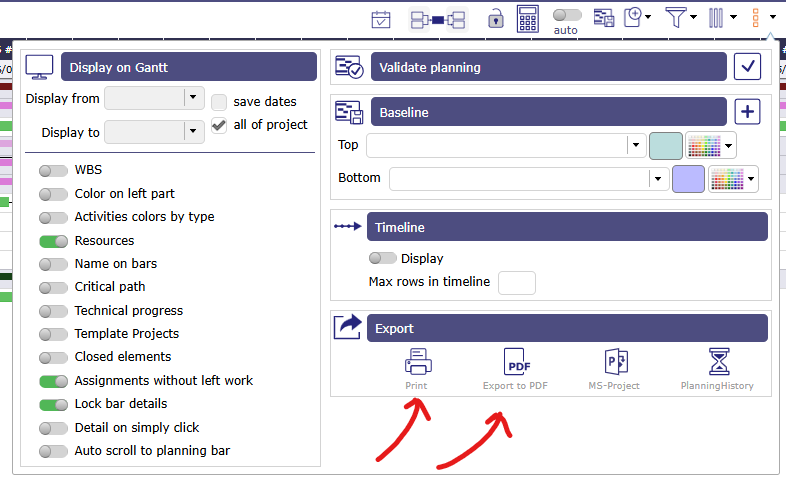
I'm still very new to Projeqtor,  I have recalculated the capacity planning, and as you stated, the error went away.  However, it is still not what I'm hoping for.  I was hoping for something that would create a nice print out of just the Gantt chart.  I thought maybe that red block was the gantt chartt, then I could use my browser's "Show image in new tab" feature or something.  Is there a way to get a nice print of the Gantt chart for a particular project?

Thanks again.

MG
Last edit: Today 13:02 by moonglum.

Please Connexion or Create an account to join the conversation.

More
Today 14:06 #4 by maxca
You can select a project in the project selector and print your Gantt chart using the options below.
 

There is a manual that can help you, as well as training courses provided by our trainers.
Training  :https://www.projeqtor.org/en/services/training-en
Manual : demo.projeqtor.org/docs/user/html_en/index.html
Have a good day,
Attachments:

Please Connexion or Create an account to join the conversation.

Moderators: babynusprotion
Time to create page: 0.056 seconds

Paramétrages de cookies

×

Cookies fonctionnels

Ce site utilise des cookies pour assurer son bon fonctionnement et ne peuvent pas être désactivés de nos systèmes. Nous ne les utilisons pas à des fins publicitaires. Si ces cookies sont bloqués, certaines parties du site ne pourront pas fonctionner.

Session

Veuillez vous connecter pour voir vos activités!

Autres cookies

Ce site web utilise un certain nombre de cookies pour gérer, par exemple, les sessions utilisateurs.